
I Tried to Make My Blog More AI-Friendly. I Made It Invisible Instead. — A GenReady.ai Review
I Tried to Make My Blog More AI-Friendly. I Made It Invisible Instead.
Overall: 87 → 61. Crawlability: 100 → 35.
This was the result of an evening I spent trying to improve my blog for AI.
How it started
Earlier this month, Kristiyan Lukanov — a Bulgarian developer I'd connected with on LinkedIn — sent me a note. He's building a tool called GenReady.ai that diagnoses how well a website can be read by AI. He'd seen my personal blog (this one, built in Next.js), and asked if I'd try it and share honest feedback.
I said yes immediately.
My first scan wasn't bad at all:
- Overall: 87
- Content: 72
- Crawlability: 100 ← AI crawlers could see the site fine
A passing grade, but Content at 72 suggested room to improve. "Let's push this higher," I thought, and that evening I opened Claude Code and started improving the blog together with it.
What followed was a long night.
What is GenReady.ai, in one paragraph
Traditional SEO tools (Ahrefs, SEMrush) measure your ranking on the Google results page — what position you sit at, who's linking to you. GenReady looks at the same internet but from a different angle: it asks whether generative engines — ChatGPT, Claude, Perplexity, Google AI (Gemini) — can actually understand and cite your site. The shift is from "rank" to "get cited." This new area has a name — Generative Engine Optimization (GEO). You paste a URL, click "Analyze," and a few minutes later you get two scores — Content and Crawlability — plus a detailed Fix Checklist. That checklist becomes the main character of this story.
Round 1: improvements with Claude Code
I pasted the GenReady report URL into Claude Code and told it:
"I've read the report. The report page is JS-rendered so I'm sending you screenshots. Let's go through the Fix Checklist and improve the blog."
Claude Code went through the checklist, item by item:
| Item | State | Fix |
|---|---|---|
| Schema Markup | ❌ Missing | Added JSON-LD |
| Tables and Lists | ❌ 0% | Added tables/lists to homepage |
| Content Repetition | ❌ 10% unique words | Expanded copy to diversify vocabulary |
| Content length | ❌ 52 words | Expanded to 500+ words |
| External Citations | ❌ 0 links | Added links to authoritative sources |
| Author Info | ❌ Not found | Added an author section |
I added an "About the Author" section, embedded JSON-LD, dropped a stats table onto the homepage, added outbound citations, and enriched the copy.
It felt great. Classic vibe coding — GenReady pointing at what to fix, Claude Code executing, me approving. A deeply satisfying rhythm.
Then I deployed. And I rescanned.
And the score went down
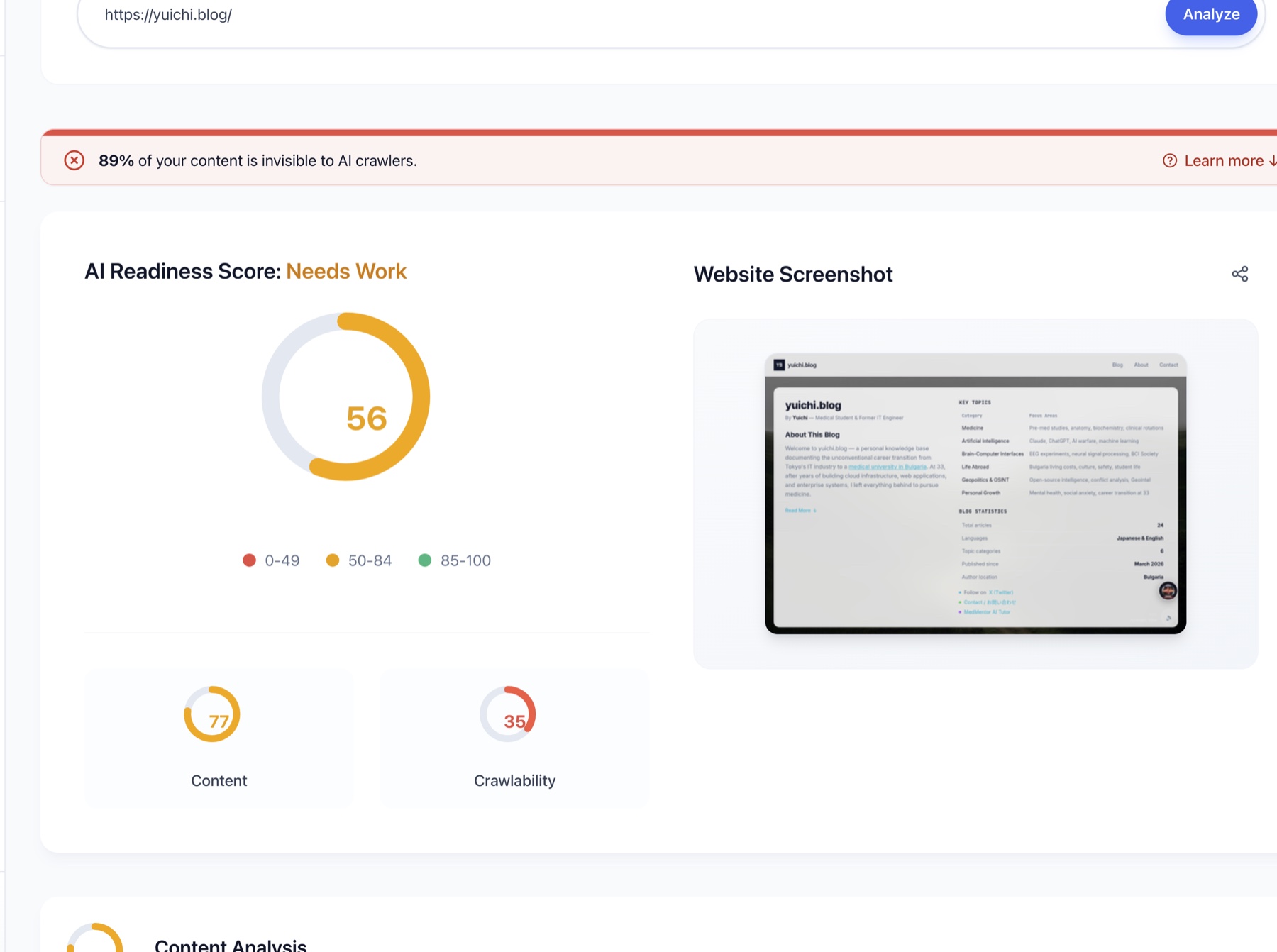
Results after round 1:
- Overall: 87 → 61
- Crawlability: 100 → 35 🔴
- Content: 72 → 86 ← this part improved
And at the top of the report, the red banner:
⊘ 89% of your content is invisible to AI crawlers.
What?
Content actually improved — fair enough, I'd followed the instructions. But Crawlability had collapsed from 100 to 35. Content that had been perfectly visible was now almost entirely hidden.
My "improvements" had made my blog more invisible to AI, not less.
The root cause: Next.js Client Components
I went back to Claude Code with the new report. The cause was plain.
The things I had added — the new "About the Author" section, the Script tag loading JSON-LD, several new components — were being rendered on the client. In Next.js terms, they were inside "use client" boundaries, or loaded via Script(beforeInteractive). Browser-executed code.
Here's what was actually happening:
- Browsers: execute JavaScript → the added content is visible ✅
- Google Search: Googlebot does run JavaScript eventually → visible ✅
- AI crawlers (GPTBot, ClaudeBot, PerplexityBot): do not execute JavaScript → the added content is completely invisible ❌
So my shiny new "AI-friendly" structured data was effectively unreachable for AI crawlers, even though it rendered fine in a browser. The human audience could see it. Google could see it. But the AI audience — the actual audience GenReady was measuring — only got the empty shell.
Claude Code's diagnosis put it sharply:
"The main issue is that 89% of the content is invisible to Fast Crawlers (GPTBot, ClaudeBot). The cause is the homepage's client-rendered components, including the About the Author section wrapped in
"use client", and theScript(beforeInteractive)tags."
I had been "fixing" without understanding the Crawlability side of the equation. Every addition I made for the AI audience was, paradoxically, hidden from them.
Round 2: Server Components and SSR
It was getting late, but Claude Code and I went at it again:
- Moved JSON-LD out of
Script(beforeInteractive)and embedded it directly in server-rendered HTML via a Server Component - Converted the "About the Author" section to a Server Component (no
"use client") - Restructured the homepage so all key content is in the initial HTML response
- Used Static Generation where possible
To make this concrete, here's a simplified before/after.
Before — JSON-LD and the About section trapped inside a Client Component:
// app/page.tsx
"use client";  // ← the killer

import Script from "next/script";

export default function HomePage() {
  return (
    <>
      <Script
        id="ld-json"
        type="application/ld+json"
        strategy="beforeInteractive"  // AI crawlers don't run scripts
      >
        {JSON.stringify(personSchema)}
      </Script>
      <AboutTheAuthor />  {/* also inside the client boundary */}
    </>
  );
}
After — Server Component baking everything into the initial HTML:
// app/page.tsx — a Server Component (no "use client")

export default function HomePage() {
  return (
    <>
      {/* JSON-LD rendered as a plain <script> tag in the SSR'd HTML.
          AI crawlers receive it in the initial response. */}
      <script
        type="application/ld+json"
        dangerouslySetInnerHTML={{ __html: JSON.stringify(personSchema) }}
      />
      {/* About section is also a Server Component; the text is fixed at SSR. */}
      <AboutTheAuthor />
    </>
  );
}
The key move is simple: don't put "use client" at the top of the file, and the whole subtree is treated as a Server Component, with its text baked into the HTML response. When GPTBot hits the URL, it's no longer staring at an empty shell.
The Next.js App Router has an easy trap: when something feels interactive-ish, you reach for "use client". From an AI crawler's point of view, anything behind "use client" might as well not exist.
After redeploying and re-scanning:
- Crawlability: 35 → 100 🎉
- Overall: 61 → 96
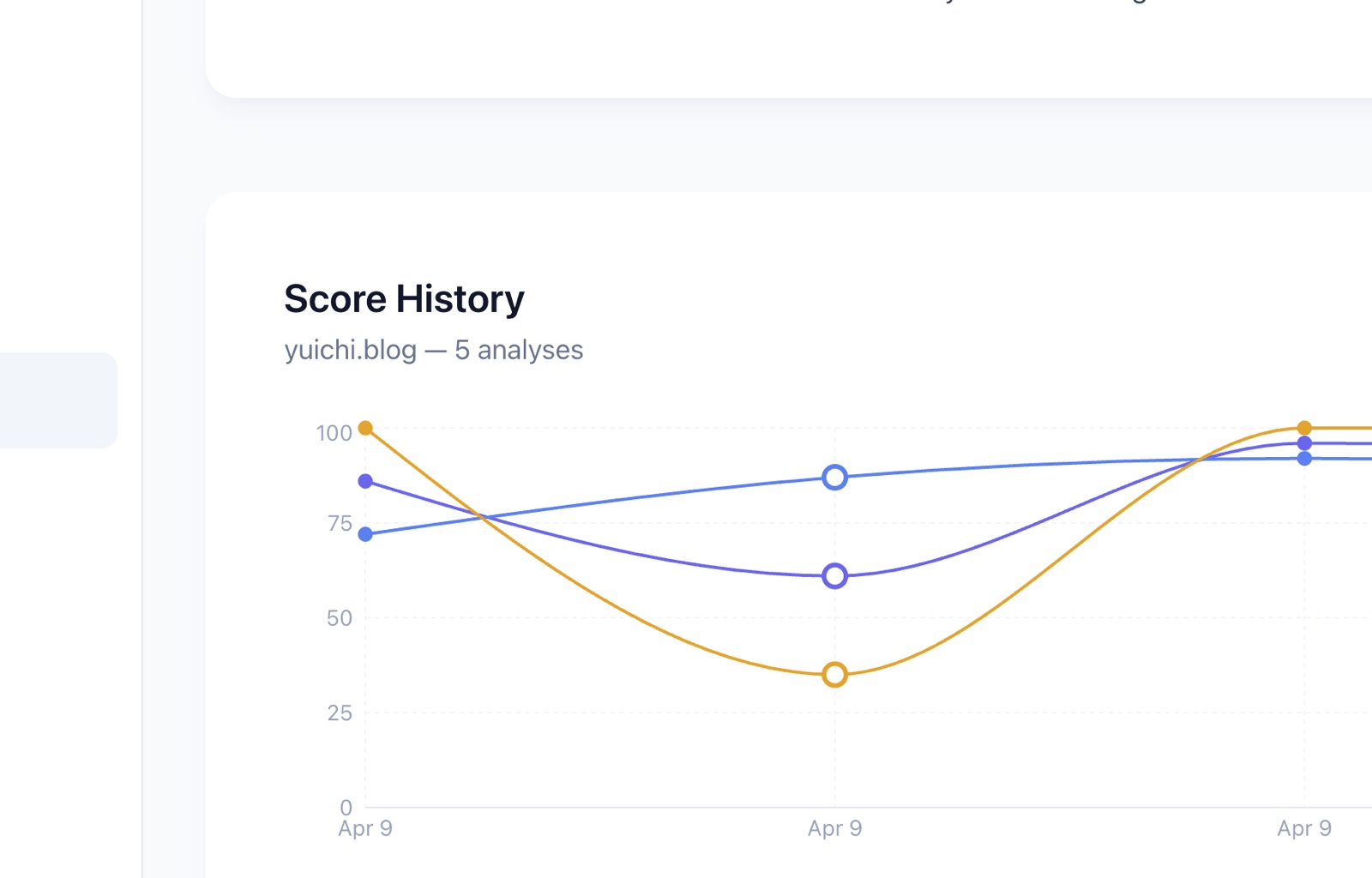
On the Score History chart, you can see the V-shaped dip I created that evening: 100 → 35 → 100 in the span of a few hours.
Where GenReady actually earned its keep
Lots of SEO tools give you a one-off report. GenReady.ai impressed me during this specific night because it functioned as a co-pilot for the improvement process, not just a snapshot.
✅ What I liked
-
History graph catches regressions Without the score history, I'd have struggled to see that my "improvements" had caused the drop. The graph made cause and effect obvious. This alone makes GenReady useful as a continuous monitoring tool, not just a diagnostic one.
-
Fix Checklist is designed for AI coding tools Every item is written to be pasted straight into Claude Code, Cursor, or similar. If you're vibe coding, the handoff is seamless.
-
Per-crawler visibility is sharp GenReady breaks down visibility by crawler — GPTBot / ClaudeBot / PerplexityBot / Googlebot — with word counts. This is what surfaced my specific problem ("Fast Crawlers can't see this"). A generic "AI-readable" score wouldn't have been enough.
-
Warnings that hit "89% of your content is invisible to AI crawlers" is a shock sentence. Not a gentle suggestion. Exactly the tone that gets me to act.
-
Simple Paste URL. Click Analyze. No setup.
💭 What I'd love to see
-
A "JavaScript-rendering wall" hint when it's the actual problem In my case, GenReady already detected I was on Next.js and that Crawlability was tanking. If the report had explicitly told me "this looks like a JavaScript-rendering wall — your content may be hidden from AI crawlers because it's rendered client-side", I would have saved an hour and known exactly which lever to pull. A short framework-aware hint at the top of a Crawlability-failing report would be a huge UX win for solo developers using Next.js, Nuxt, SvelteKit, or Remix.
-
A Japanese UI English-only right now. There's a big Japanese audience of individual bloggers and small site owners who would benefit.
-
More transparency on scoring For each category, a deeper breakdown of how the score is calculated would help me prioritize the right fix when juggling multiple issues.
-
Clearer pricing tiers I want to know, upfront, the free-scan limits and paid plans — especially if I end up monitoring multiple sites continuously.
A note for beginner bloggers
If you run a blog on a modern JavaScript framework — Next.js, Nuxt, SvelteKit, Remix — run it through GenReady once.
"It works in my browser" doesn't mean "AI crawlers can see it." These are two different questions, and one of them is getting more important each year.
In 2026, being readable by AI is becoming a separate, independent variable from being readable by Google. My hunch is that within a few years, having this lens will meaningfully change which personal sites get cited and surfaced by generative engines.
To put it more directly: the next era of personal-blog traffic isn't only the blue links on a Google SERP — it's also whether a generative engine cites your article when answering someone's question. Being quoted by ChatGPT, Claude, or Perplexity is becoming the new "rank 1." For solo bloggers, the win condition is shifting from "ranks well" to "gets cited." That's the real bet behind Generative Engine Optimization (GEO), and the one this kind of tool is helping to make tractable.
And checking where your site stands on this takes about five minutes.
Closing
In one evening, I experienced the full cycle: visible to AI → broke it by trying to improve it → fixed it with SSR. The takeaway is blunt: when you add structured data or new sections for AI readability, make sure they're actually rendered in a way AI crawlers can reach.
The reason I could learn this lesson in a single night is because GenReady.ai was there to show me the regression in real time. Without the tool, I might have believed my "improvements" were helping for weeks.
Kristiyan — thank you for the nudge. This blog is finally, genuinely, talking to the AIs too.
Try it: GenReady.ai Creator: Kristiyan Lukanov (@HDRobots)
Written in Pleven, Bulgaria, the night my blog stopped talking to an empty room. 🦞