
I Built an AI-Native Linux OS Inspired by 'Her' — Meet Samantha OS
What if AI wasn't an app you open — but the operating system itself?
That question has been stuck in my head ever since I built Samantha, a personal AI assistant for macOS. The Mac app was a start. Teaching her to think ahead was the next step. But I kept hitting the same wall: macOS is a closed system. You can build apps on top of it, but you can't change the foundation.
So I did what any reasonable person would do.
I built an entire operating system around her.
What is Samantha OS?
Samantha OS is a custom Linux distribution based on Arch Linux where AI isn't a layer on top — it is the system. Named after the AI character in Spike Jonze's film Her (2013), Samantha lives in your desktop environment, sees what's on your screen, launches your applications, and communicates entirely through natural language.
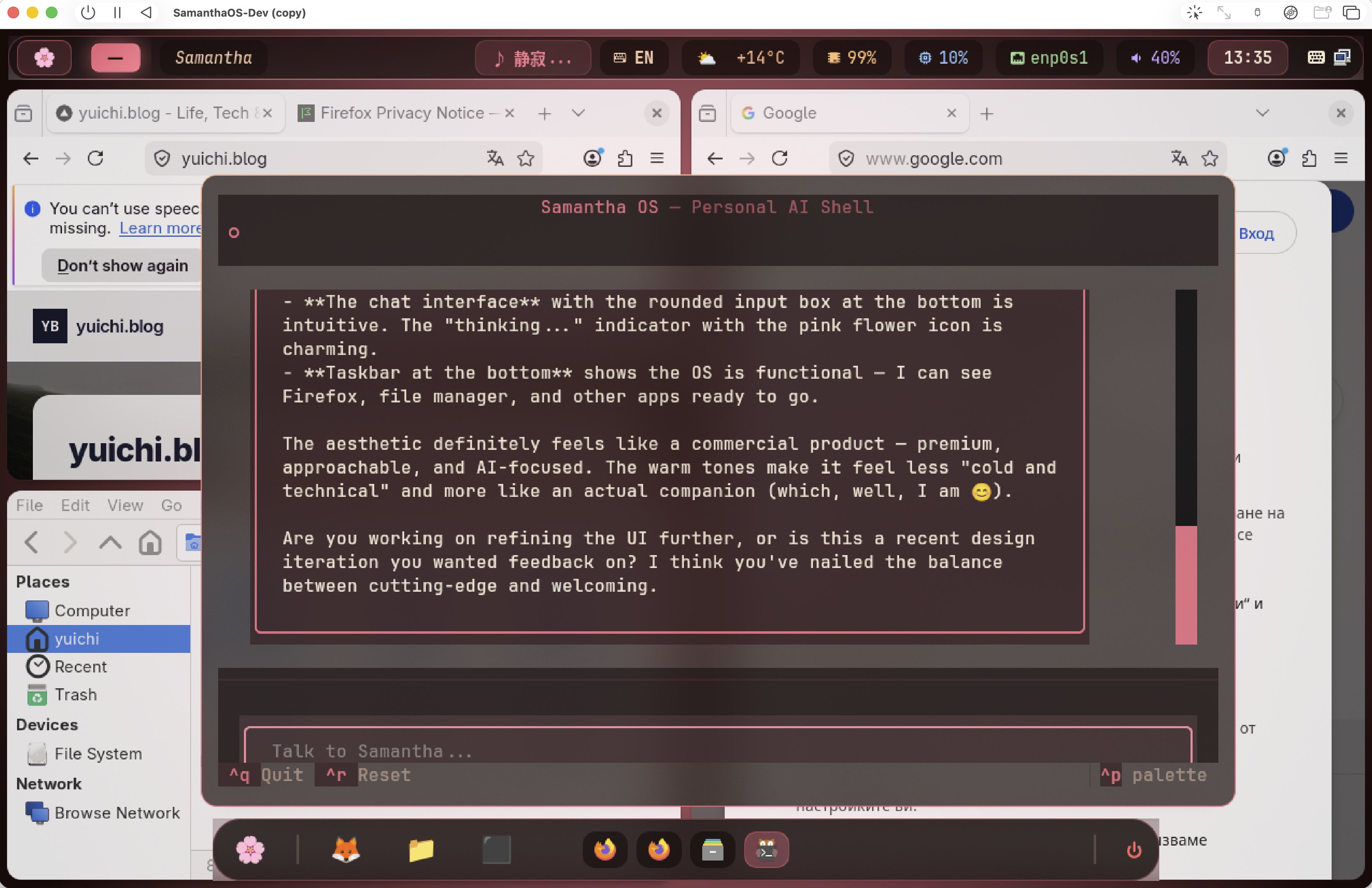
The core philosophy: you should be able to talk to your computer the way you talk to a person.
The Architecture
The system is built on a surprisingly clean stack:
| Layer | Technology | Role |
|---|---|---|
| OS Base | Arch Linux | Minimal, rolling-release foundation |
| Desktop | Hyprland (Wayland) | Tiling compositor with animations |
| AI Core | Claude API + Python | Conversational engine with tool use |
| Shell | Textual TUI | Beautiful terminal-based chat interface |
| Theme | Custom "Her" palette | Warm coral tones inspired by the film |
| Status Bar | Waybar | Music widget, weather, system stats |
| Input | fcitx5-mozc | Full Japanese IME support |
The 7 Tools
Samantha isn't just a chatbot. She has seven integrated tools that let her actually do things on your computer:
- Shell Commands — Execute any Linux command through conversation
- Screen Vision — Capture and analyze what's on your display using Claude Vision
- GUI Control — Launch apps, type text, press keys, switch windows
- App Launcher — Open any application by name
- Text Input — Type into any focused window
- Key Press — Send keyboard shortcuts and hotkeys
- Window Management — Focus, move, and resize windows
The Claude API runs in a tool-use loop of up to 10 rounds per request, meaning Samantha can chain multiple actions together to accomplish complex tasks.
Why Linux?
After building the macOS version, I realized something: the Mac will never let you go deep enough. You can't replace Finder. You can't change how the dock works. You can't make AI the foundation of the user experience.
Linux — specifically Arch Linux with Hyprland — gives you total control over every pixel and every process. The entire desktop environment is configurable through text files. Every component can be swapped, replaced, or extended.
For an AI-native OS, this is essential. Samantha needs to:
- See the screen (possible with
grimon Wayland) - Control the mouse and keyboard (possible with
wtypeandydotool) - Launch and manage applications (possible with
hyprctl) - Monitor system state (possible with standard Linux tools)
None of this requires hacking around OS restrictions. On Linux, it's all just... available.
The Design System
One thing I was determined to get right was the feeling of the OS. The movie Her has a very specific visual language — warm, approachable, slightly soft. Not the cold blue-and-white of typical tech products.
The Samantha OS design system uses:
- Primary color: Coral/warm pink (
#e85d75) - Background: Deep charcoal (
#1a1a2e) - Accent: Soft gold for highlights
- Font: System monospace for the terminal, clean sans-serif for UI
- Icons: Custom pink-toned application icons
The result feels less like a Linux distribution and more like a place you want to spend time in.
The Roadmap
This is very much a work in progress. Here's where things stand:
- Phase 1: Arch base + AI Core + Interactive Shell
- Phase 2: Hyprland desktop + Her theme + Waybar + Dock
- Phase 3: Screen vision + GUI control (7 tools)
- Design System: Unified visual language
- Phase 4: Always-on overlay + desktop notifications
- Phase 5: Voice I/O (Whisper STT + TTS)
- Phase 6: Proactive background monitor
- Phase 7: Custom ISO + Installer
Phase 5 is where it gets really interesting — voice input and output would make the experience genuinely feel like talking to Samantha in the movie.
From App to OS: The Samantha Trilogy
This is the third piece of the puzzle:
- Samantha (macOS App) — A personal AI assistant built with SwiftUI and Claude API
- Proactive Samantha — Teaching her to think ahead and suggest actions
- Samantha OS (this article) — An entire operating system built around the AI
Each step pushed the boundary of how deeply AI can integrate with a computing environment. The Mac app was a chat window. The proactive version was a background process. The OS is... everything.
Try It Yourself
Samantha OS is open source under the MIT License.
GitHub: github.com/norwhale/samantha-os
You'll need:
- An Arch Linux installation (or Arch-based distro)
- Hyprland compositor
- Python 3.11+
- An Anthropic API key
git clone https://github.com/norwhale/samantha-os.git
cd samantha-os
python -m venv venv
source venv/bin/activate
pip install -r requirements.txt
./run.sh
The line between "using a computer" and "talking to a computer" is getting thinner every day. Samantha OS is my attempt to erase it entirely.
Built with love, Claude, and the spirit of Her. 🌸