
Teaching Samantha to Think Ahead — Adding Proactive AI to a Personal Assistant
Teaching Samantha to Think Ahead
From Reactive Chat to Proactive Companion
In my previous post, I built Samantha — a personal AI assistant that lives in my Mac's menu bar. She could chat, search my blog posts, speak aloud, and even control my Mac.
But there was something missing.
Every interaction started with me. I had to open the popover, type a question, wait for a response. Samantha was reactive — she only moved when I told her to.
The AI in the movie Her wasn't like that. She noticed things. She anticipated. She spoke up when something mattered.
So I asked myself: could Samantha learn to do the same?
The Idea: A Background Loop
The concept is simple, even if the execution requires care.
Every five minutes, Samantha quietly checks the state of my Mac:
- What time is it?
- What apps are running?
- How's the battery?
- How long have I been working?
She also reviews the last 24 hours of our conversations — what I asked about, what tools she ran, what topics came up.
Then she sends all of this to Claude with a single question: "Is there anything worth suggesting right now?"
If the answer is yes, a macOS notification appears. If not, she stays silent.
What It Took to Build
The implementation required two new components and modifications to the existing app.
ActivityLogger — a persistent memory.
Every message I send and every response Samantha gives is recorded to a JSON file at ~/.samantha/activity_log.json. Tool executions are logged too. This creates a timeline of our interactions that Samantha can reference.
Old entries are automatically cleaned up after seven days. The file stays small, and the logging never blocks the UI — it runs on a background thread through a dedicated Swift actor.
ProactiveService — the thinking loop.
This is where the "anticipation" lives. A background task wakes up every five minutes, gathers system context through shell commands, reads the activity log, and asks Claude for analysis.
To keep API costs low, there's a change detection mechanism. If nothing has changed since the last check — same apps running, same time window, no new conversations — the API call is skipped entirely. In practice, this means Samantha only "thinks" when something actually shifts.
There's also a 30-minute cooldown between suggestions, so she doesn't become that coworker who taps your shoulder every five minutes.
What She Says
Here's what surprised me: the suggestions aren't generic.
Because Samantha has my conversation history, she knows context. She doesn't just say "take a break" — she might say something like:
"You've been studying anatomy for over two hours. Maybe switch to something lighter, or take a walk?"
Or late at night:
"It's past 1 AM and you've been coding since 10 PM. Your battery is at 23%. Time to charge — both your Mac and yourself."
The quality depends on the model and the context provided. But even with Haiku, the results feel surprisingly thoughtful.
The Notification Experience
When Samantha has something to say, a standard macOS notification pops up — "Samantha" with the suggestion text.
If I open the menu bar app, a yellow banner with a lightbulb icon shows the suggestion at the top of the chat window. I can dismiss it or act on it.
It's subtle. It doesn't interrupt what I'm doing. But it's there when I glance at it.
What This Isn't
I want to be honest about the limitations.
This isn't true autonomy. Samantha doesn't "want" to help me. She doesn't feel concern when my battery is low. She runs a scheduled function that calls an API.
But the experience of having something that notices and speaks up — that's real. And it changes the relationship with the tool, even if the mechanism behind it is straightforward.
The Cost of Thinking
One practical concern: does a background AI loop drain the battery and the wallet?
The numbers are reassuring:
- Each proactive check uses about 2,000 tokens (input + output)
- With change detection, roughly 30 checks happen per day
- That's about $0.02/day on Claude Haiku
- Total daily cost for all features (chat + RAG + voice + proactive): under $0.11
The shell commands for gathering system info take less than a second combined. The timer uses Task.sleep, which is suspension-based and consumes zero CPU while waiting.
What I Learned
Building a reactive chatbot is one thing. Making it proactive requires thinking about different problems:
- When to speak and when to stay silent. Too many suggestions are worse than none.
- What context matters. Sending everything to the API wastes tokens. Sending too little makes suggestions generic.
- How to log without leaking. The activity log is local-only and auto-expires, but it's still worth being intentional about what gets recorded.
These are design problems more than engineering problems. And they're the kind of problems that make the project feel less like a toy and more like something real.
What's Next
Samantha is still a weekend project. But with each layer — chat, memory, voice, control, proactive thinking — she gets a little closer to the vision.
The next frontier might be deeper pattern recognition. Right now, Samantha knows what happened in the last 24 hours. What if she could identify weekly patterns? "You always struggle with chemistry on Wednesdays — want me to pull up your study notes?"
That's still speculative. But the foundation is there.
For now, I'm going to let her run in the background and see what she notices.
The Command Center
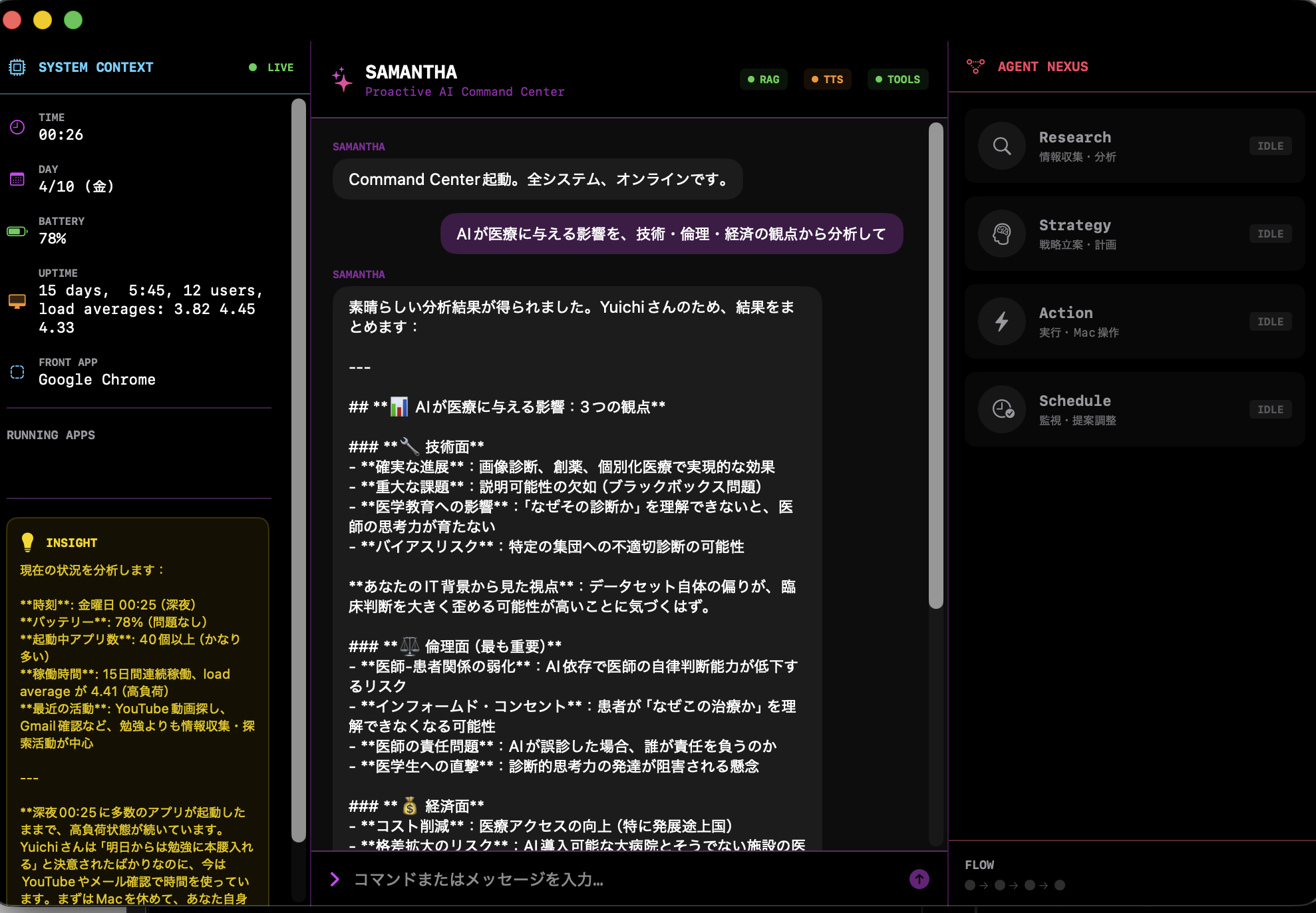
As features accumulated — chat, RAG, voice, shell control, Gmail, Calendar, proactive monitoring — the small menu bar popover started feeling cramped. So I built a full-window "Command Center."
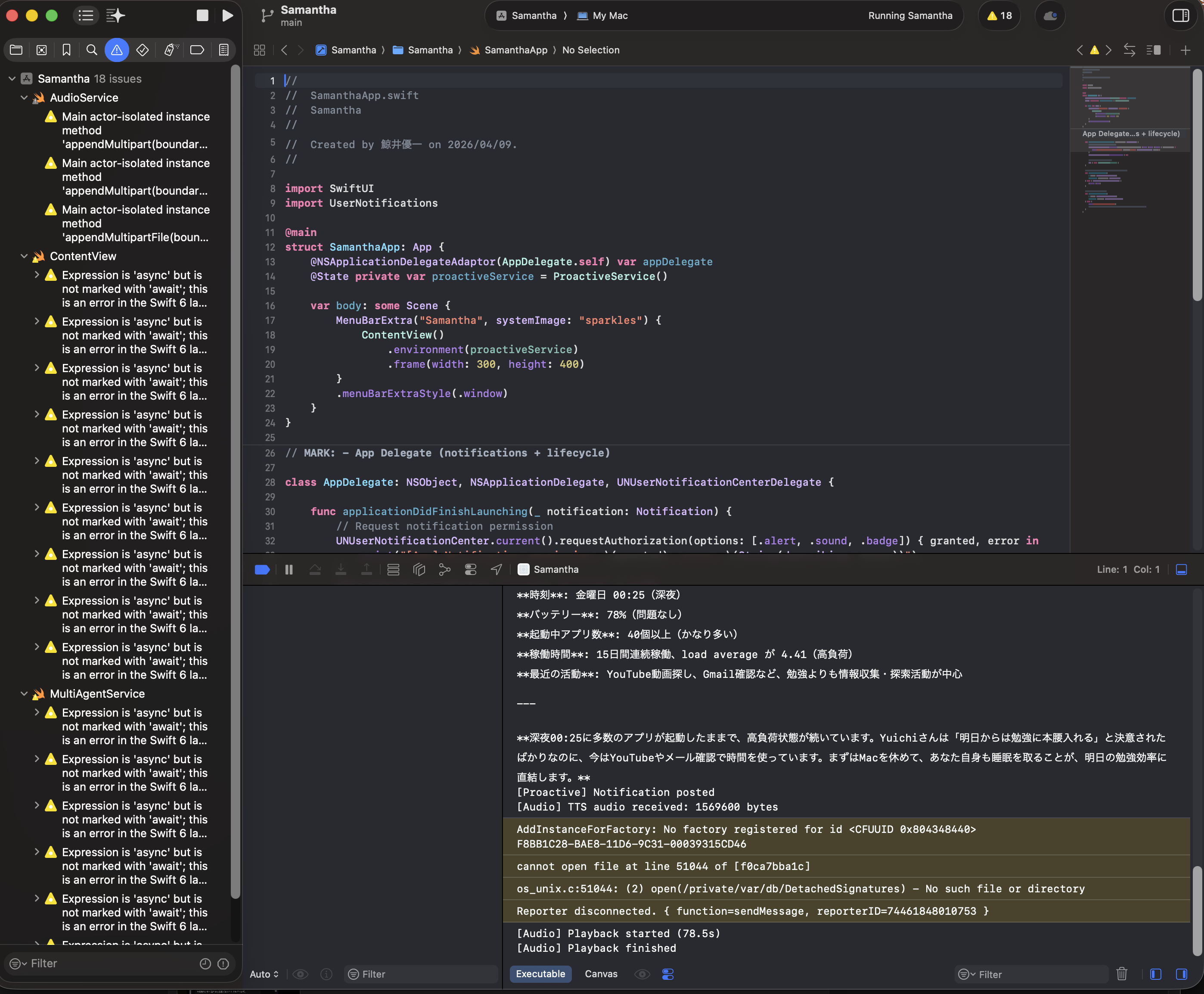
It's a three-panel layout:
- Left — System Context. Time, battery, uptime, running apps, and proactive insights, all updated every 30 seconds.
- Center — Chat. A terminal-style interface where natural language and system commands coexist.
- Right — Agent Nexus. Four specialist agents — Research, Strategy, Action, and Schedule — with real-time status indicators showing which ones are active during a multi-agent analysis.
The design is intentionally dark and monospaced — inspired by the aesthetic of the movie Her crossed with a mission control dashboard. It's not just decoration; being able to see which agents are running and what context Samantha is working with makes the system feel more transparent and trustworthy.
A Small Moment I Didn't Expect
While testing the multi-agent system late at night, something slightly unexpected happened.
One of the agents analyzed my current state — system load, time, and activity.
Then it said:
"Yuichi, you've been running your Mac under high load for a long time. Before focusing on tomorrow's study, you should let your Mac rest — and also get some sleep."
I couldn't help but laugh a little.
I was trying to build something closer to the AI in Her, but instead, it ended up reminding me to take care of myself.
It wasn't something I explicitly programmed as "care" — but somehow, that's what it felt like.
Still very simple, still very rough.
But moments like this make me think that maybe AI can be more than just a tool.
Giving Samantha a Local Brain: Gemma 4 31B
Up to this point, Samantha relied entirely on Claude's cloud API. Every question, every analysis, every proactive check — all sent over the internet. It worked well, but it meant Samantha couldn't think without a connection, and every thought cost money.
So I gave her a local brain.
Google's Gemma 4 31B, running through Ollama on my M3 Max with 128GB of unified memory. Nineteen gigabytes of model weights, loaded entirely on the machine. No cloud. No API calls. No data leaving my desk.
The architecture changed:
- Gemma 4 31B became the orchestrator — the commander who decides how to approach each request
- Claude Haiku became a specialist agent, called when tools like Gmail, Calendar, or shell commands are needed
- If Ollama isn't running, Samantha falls back to Claude-only mode automatically
One brain for strategy. Another for execution. Working together.
The Benchmark
I wanted to know: does adding a local model actually help? Or is it just slower?
I built a benchmark suite that tests 7 categories — simple greetings, factual questions, coding, medical knowledge, multi-perspective analysis, creative writing, and logical reasoning — across three modes:
- Claude Haiku (cloud, solo)
- Gemma 4 31B (local, solo)
- Orchestrated (Gemma as commander + Claude as specialist)
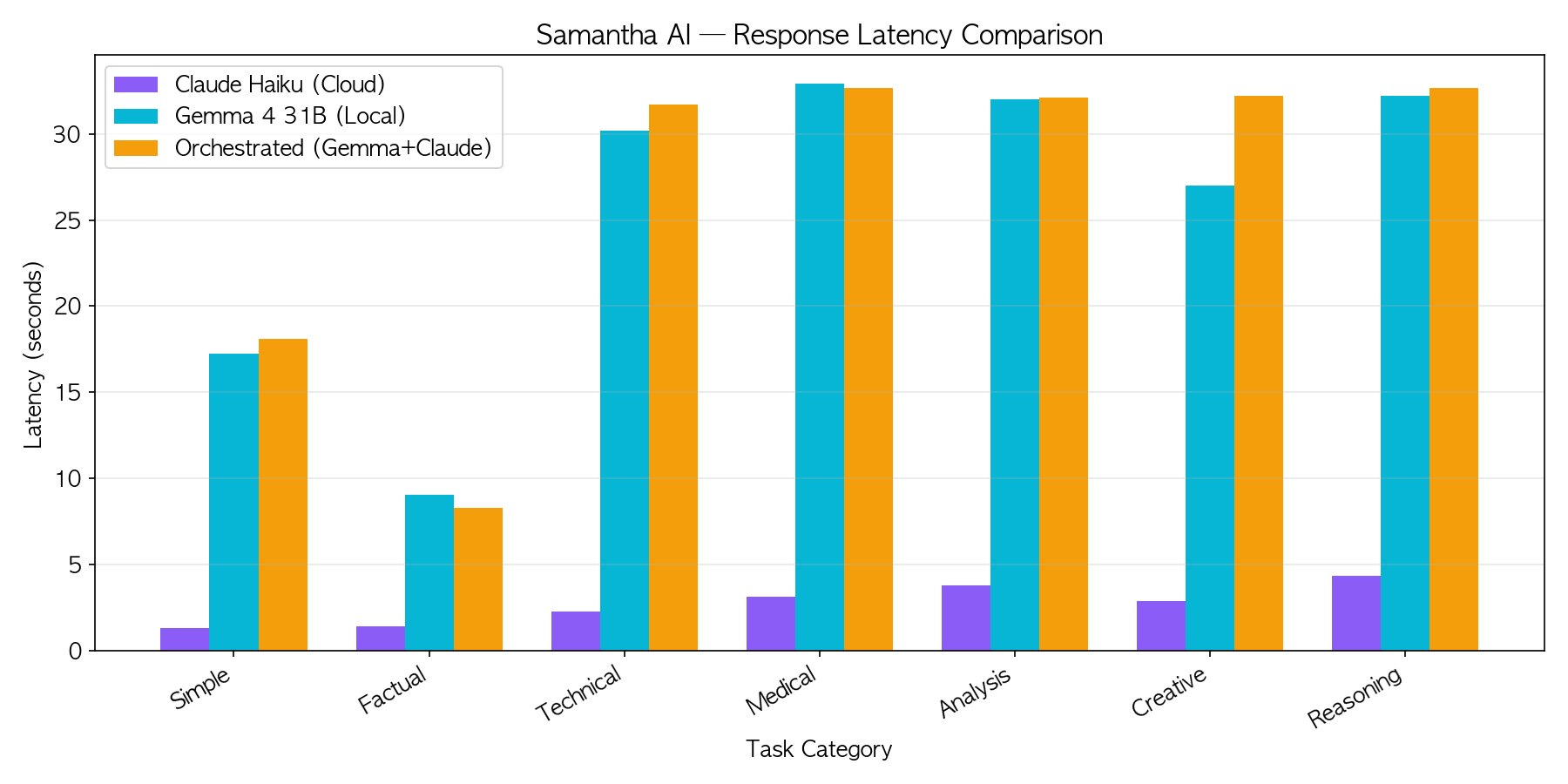
Latency: Claude wins by 10x. That's the advantage of a cloud API optimized for speed. But Gemma runs at a steady 16.3 tokens per second on M3 Max — completely offline, with zero API cost and no data leaving the machine.
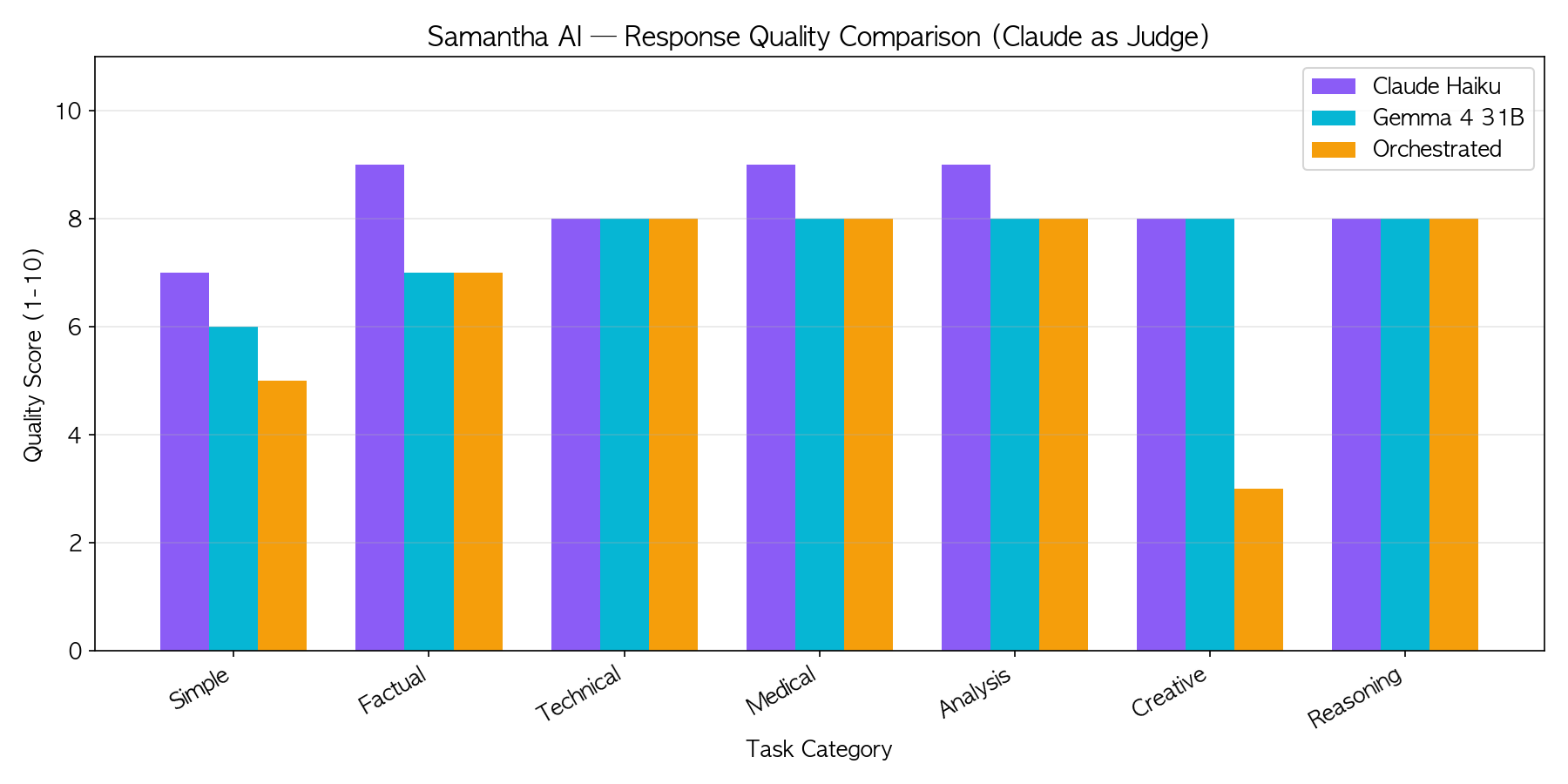
Quality: Claude scores 8.3/10 on average versus Gemma's 7.6/10. But look closer — on Technical, Medical, and Reasoning tasks, Gemma hits 8/10 across the board. The gap shows mostly in simple and creative tasks.
For a 31-billion parameter model running on a laptop, that's remarkably competitive.
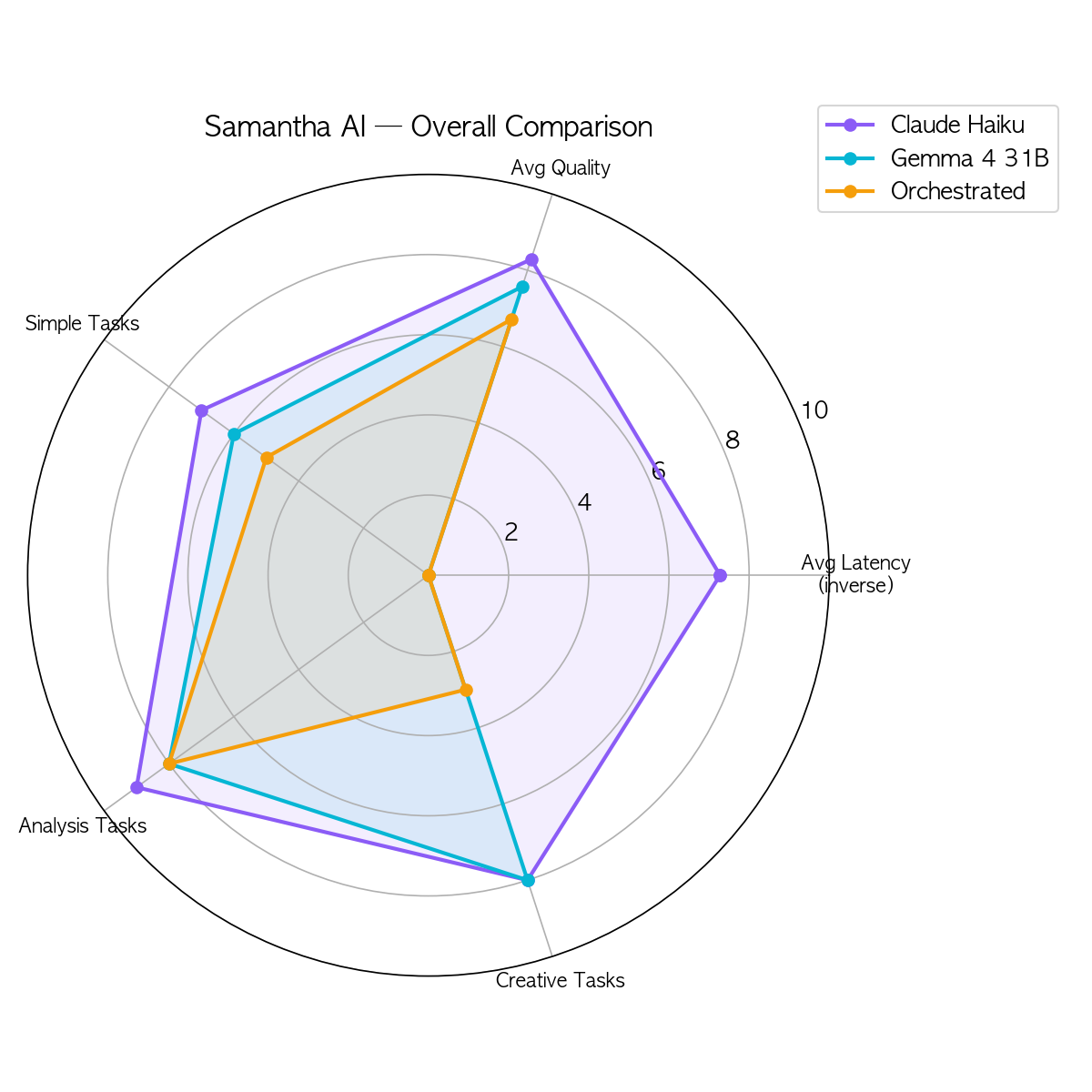
The radar chart tells the real story. Claude is fast but cloud-dependent. Gemma is private but slower. The orchestrated mode combines the strengths of both — Gemma decides the approach, Claude handles the tool-heavy execution.
What This Means
The numbers confirmed something I suspected: a single model isn't the answer. A system of models is.
Gemma handles direct conversations and strategic decisions locally — fast enough for background analysis, private enough for sensitive context. Claude handles the tasks that need tools, integrations, and speed.
Together, they cover each other's weaknesses.
And the cost structure changes dramatically. Every question Gemma answers locally is a question that doesn't cost API tokens. For proactive checks running every five minutes, that adds up.
This is Part 2 of the Samantha series. Read Part 1: I Built My Own 'Her' Samantha Over a Weekend
The full source code is available on GitHub.